About Faceter Video Surveillance
Faceter is smart cloud video surveillance (VSaaS) with its own line of security cameras. Connect third-party IP cameras or use a smartphone as a camera without buying equipment. Monitor offices, warehouses, stores, and...
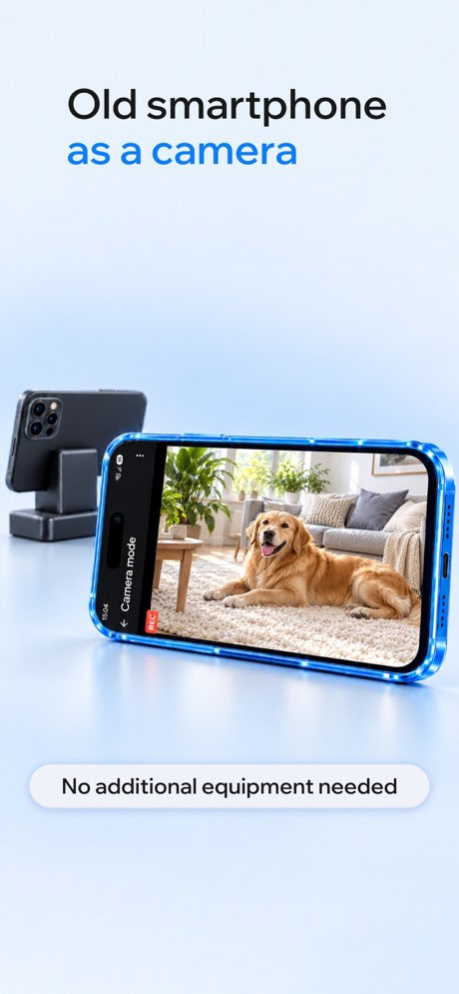
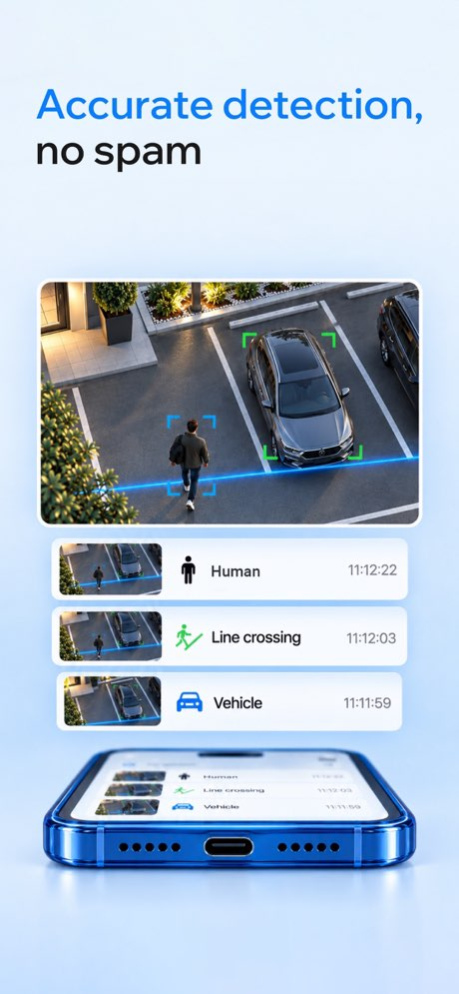
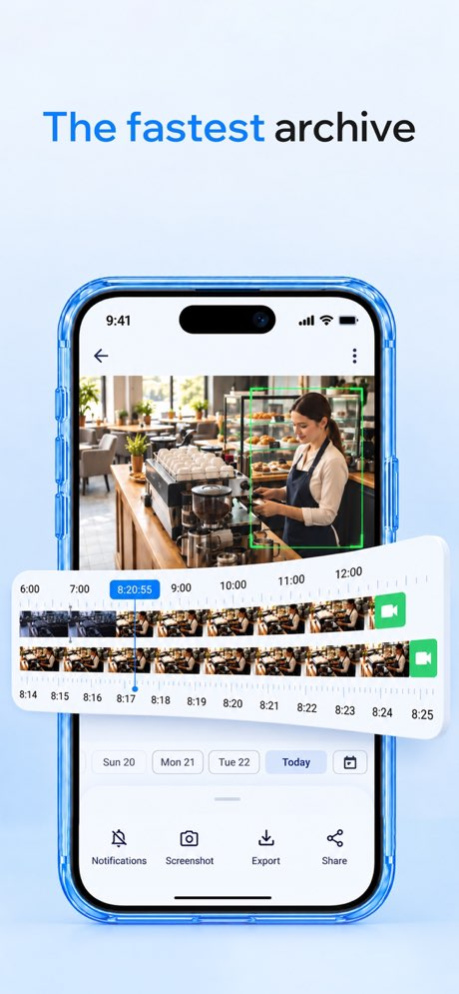
Faceter is smart cloud video surveillance (VSaaS) with its own line of security cameras. Connect third-party IP cameras or use a smartphone as a camera without buying equipment. Monitor offices, warehouses, stores, and your home from a single system. Get notifications in Telegram and Max, and use an AI Agent for quick archive search instead of long video playback. Why You Need Faceter Faceter combines any cameras into a single smart video surveillance system. Connect devices via ONVIF or RTSP with a public IP address. You can: . Watch live video from any camera online through the cloud . Use a smartphone as a surveillance camera (turn an old phone into an IP camera) without buying equipment . Find any moment in the archive in seconds with smart event marking and timeline search instead of hours of viewing . Keep video surveillance 24/7 . Get a free daily timelapse in messengers: review your whole day in 1 minute . Receive event descriptions from the AI Agent . Get event alerts via push notifications and messengers (Telegram, Max, etc.) . Use the app on phone, tablet, computer, Mac, Windows, and TV Any Cameras, One System Maximum stability is ensured with Faceter's cameras: full compatibility and all analytics out of the box. Already have third-party cameras? Connect them via ONVIF and RTSP protocols. Faceter records video locally to an SD card without internet or cloud fees. In development: our line of network video recorders (NVR) for hybrid systems. Review a full day's archive in 5 minutes and download any clip instantly. We built a practical app design, fast servers, and a special cloud storage format. Connecting a camera takes a couple of minutes. An old smartphone connects just as easily: convert a phone into a security camera without buying extra hardware. Smart Detections Built-in detections recognize human silhouettes, vehicles, pets, and movement, capturing line crossings and intrusions. The system cuts false alarms like rain, snow, waving branches, and shadows. You only get push alerts during real events. Faceter AI Agent The AI Agent works in Telegram, Max, or in the app. Chat with it in plain text instead of watching video. Ask a question and get a precise summary from the archive: "What time did the delivery car arrive?", "What happened on site from 12:00 to 13:00?", or "Did anyone enter the warehouse after closing?". The agent also sends concise text descriptions of current events: "Person passed by", "Truck entered", "Dog near the door". Why Choose Faceter Faceter is an analytics tool with a transparent pricing model. . AI Agent without overpaying: text reports are included in cloud subscriptions. No extra payment for AI features. . Free basic features: live streaming and smart detections work free without a cloud plan. Cameras can record to an SD card without internet. . No complex servers: launch without expensive servers or engineer visits. Human detection works without biometrics or facial recognition. Only Useful Features . Online live camera streaming . Timelapse: full day in a minute . Event alerts via push, Telegram, and Max . Intelligent archive search . Saving required video clips . Access rights management . Russian language interface . Faceter compatibility with Windows, Mac, and TV Faceter is also great for home: baby monitor, elderly care, or pet watching (with pet detection). Set up video surveillance in 5 minutes. Get alerts in Telegram or Max when events happen. Download Faceter and monitor your home, office, or business from anywhere!
Version History - Added payment and billing history right in the app. - Added SD card recording schedule. 3.9.13 6d ago - Added deep links in the Chat Agent for quick navigation to relevant objects and events. - Added a new events indicator in the event feed and automatic loading of new events. - Camera status changes are now displayed in the event feed, including camera online and offline events. - Added an advanced SD card event filter by event type. 3.9.12 Aug 30 - Added deep links in the Chat Agent for quick navigation to relevant objects and events. - Added a new events indicator in the event feed and automatic loading of new events. - Camera status changes are now displayed in the event feed, including camera online and offline events. - Added an advanced SD card event filter by event type. 3.9.11 Aug 14 - Added deep links in the Chat Agent for quick navigation to relevant objects and events. - Added a new events indicator in the event feed and automatic loading of new events. - Camera status changes are now displayed in the event feed, including camera online and offline events. - Added an advanced SD card event filter by event type. 3.9.10 Jul 31 - Added deep links in the Chat Agent for quick navigation to relevant objects and events. - Added a new events indicator in the event feed and automatic loading of new events. - Camera status changes are now displayed in the event feed, including camera online and offline events. - Added an advanced SD card event filter by event type. 3.9.9 Jul 9 - Added deep links in the Chat Agent for quick navigation to relevant objects and events. - Added a new events indicator in the event feed and automatic loading of new events. - Camera status changes are now displayed in the event feed, including camera online and offline events. - Added an advanced SD card event filter by event type. 3.9.8 Jun 29 - Added deep links in the Chat Agent for quick navigation to relevant objects and events. - Added a new events indicator in the event feed and automatic loading of new events. - Camera status changes are now displayed in the event feed, including camera online and offline events. - Added an advanced SD card event filter by event type. 3.9.7 Jun 26 — Faceter AI Agent is now available in the app — your smart assistant for camera event analysis is always within reach — Added support for payments via SBP — Introduced a new, clearer and more user-friendly card linking flow — Fixed bugs and improved app stability 3.9.6 Jun 8 - Faceter AI Agent is now available in the app — your smart assistant for camera event analysis is always within reach - Added support for payments via SBP - Introduced a new, clearer and more user-friendly card linking flow - Fixed bugs and improved app stability 3.9.5 May 25 – Added a new notification management section — push, email, and other notifications can now be managed directly inside the app in a much more convenient way – Improved camera preview behavior for a smoother and more reliable experience – Fixed multiple issues and polished the app interface 3.9.4 May 14 - Launched beta version of the AI agent — your assistant for analyzing camera events - Now available on iPad — with an updated interface and new capabilities 3.9.3 Apr 22 – Fast archive playback: tap and hold to quickly scrub through recordings and find what you need – Cleaner, more intuitive interface: small improvements that make everyday use easier – Smarter camera previews: outdated previews are now dimmed, so you can instantly spot which ones haven’t updated yet 3.9.2 Apr 22 - Launched beta version of the AI agent — your assistant for analyzing camera events - Now available on iPad — with an updated interface and new capabilities 3.9.1 Apr 6 - Launched beta version of the AI agent — your assistant for analyzing camera events - Now available on iPad — with an updated interface and new capabilities 3.9 Apr 1 Minor interface improvements and bug fixes to improve stability and overall experience. 3.8.9 Feb 12 – Added support for PTZ cameras. – Introduced new detections: animals, faces, and people on scooters and other personal mobility devices, along with additional detection settings. – New detection types are now shown in the event feed for supported camera models. – Added visitor counting. Detections are available only on supported camera models. 3.8.8 Jan 14 – Added support for PTZ cameras. – Introduced new detections: animals, faces, and people on scooters and other personal mobility devices, along with additional detection settings. – New detection types are now shown in the event feed for supported camera models. – Added visitor counting. Detections are available only on supported camera models. 3.8.7 Jan 13 – Added support for PTZ cameras. – Introduced new detections: animals, faces, and people on scooters and other personal mobility devices, along with additional detection settings. – New detection types are now shown in the event feed for supported camera models. – Added visitor counting. Detections are available only on supported camera models. 3.8.6 Jan 1 – Updated the display of camera subscription payment statuses to make them clearer and more consistent. – When adding multiple cameras via a sharing link, you can now select the location and room. – Other bug fixes and stability improvements. 3.8.5 12/08/2025 – Updated the display of camera subscription payment statuses to make them clearer and more consistent. – When adding multiple cameras via a sharing link, you can now select the location and room. – Other bug fixes and stability improvements. 3.8.4 11/14/2025 You can now connect cameras using a serial number — fast and easy. We’ve also made a few improvements to stability and interface. 3.8.3 10/08/2025 - Added a “Save” button in timelapse settings. - Introduced an HD/SD quality switch for mobile devices in monitor mode. - Access management for all cameras is now available in the general Settings section. 3.8.2 09/03/2025 - Added a “Save” button in timelapse settings. - Introduced an HD/SD quality switch for mobile devices in monitor mode. - Access management for all cameras is now available in the general Settings section. 3.8.1 09/01/2025 Added new feature: automatic sending of timelapse videos to Telegram is now available. You can now set up timelapse reports of 15, 30 or 60 seconds to be sent directly from the app. 3.8 07/23/2025 A new release of the iOS app is now available. What’s new: — You can now share multiple cameras at once with other users — The camera list now refreshes automatically on the dashboard — Updated SD card screen design — Updated profile screen design 3.7.13 07/09/2025
Previous Versions
Here you can find the changelog of Faceter Video Surveillance since it was posted on our website on 2021-12-25 11:20:27.
The latest version is 3.9.13 and it was updated on 2026-10-07 00:46:26. See below the changes in each version.
Faceter Video Surveillance version 3.9.13
Updated At: 2026-10-07
Changes: Version History - Added payment and billing history right in the app.
- Added SD card recording schedule. 3.9.13 6d ago - Added deep links in the Chat Agent for quick navigation to relevant objects and events.
- Added a new events indicator in the event feed and automatic loading of new events.
- Camera status changes are now displayed in the event feed, including camera online and offline events.
- Added an advanced SD card event filter by event type. 3.9.12 Aug 30 - Added deep links in the Chat Agent for quick navigation to relevant objects and events.
- Added a new events indicator in the event feed and automatic loading of new events.
- Camera status changes are now displayed in the event feed, including camera online and offline events.
- Added an advanced SD card event filter by event type. 3.9.11 Aug 14 - Added deep links in the Chat Agent for quick navigation to relevant objects and events.
- Added a new events indicator in the event feed and automatic loading of new events.
- Camera status changes are now displayed in the event feed, including camera online and offline events.
- Added an advanced SD card event filter by event type. 3.9.10 Jul 31 - Added deep links in the Chat Agent for quick navigation to relevant objects and events.
- Added a new events indicator in the event feed and automatic loading of new events.
- Camera status changes are now displayed in the event feed, including camera online and offline events.
- Added an advanced SD card event filter by event type. 3.9.9 Jul 9 - Added deep links in the Chat Agent for quick navigation to relevant objects and events.
- Added a new events indicator in the event feed and automatic loading of new events.
- Camera status changes are now displayed in the event feed, including camera online and offline events.
- Added an advanced SD card event filter by event type. 3.9.8 Jun 29 - Added deep links in the Chat Agent for quick navigation to relevant objects and events.
- Added a new events indicator in the event feed and automatic loading of new events.
- Camera status changes are now displayed in the event feed, including camera online and offline events.
- Added an advanced SD card event filter by event type. 3.9.7 Jun 26 — Faceter AI Agent is now available in the app — your smart assistant for camera event analysis is always within reach
— Added support for payments via SBP
— Introduced a new, clearer and more user-friendly card linking flow
— Fixed bugs and improved app stability 3.9.6 Jun 8 - Faceter AI Agent is now available in the app — your smart assistant for camera event analysis is always within reach
- Added support for payments via SBP
- Introduced a new, clearer and more user-friendly card linking flow
- Fixed bugs and improved app stability 3.9.5 May 25 – Added a new notification management section — push, email, and other notifications can now be managed directly inside the app in a much more convenient way
– Improved camera preview behavior for a smoother and more reliable experience
– Fixed multiple issues and polished the app interface 3.9.4 May 14 - Launched beta version of the AI agent — your assistant for analyzing camera events
- Now available on iPad — with an updated interface and new capabilities 3.9.3 Apr 22 – Fast archive playback: tap and hold to quickly scrub through recordings and find what you need
– Cleaner, more intuitive interface: small improvements that make everyday use easier
– Smarter camera previews: outdated previews are now dimmed, so you can instantly spot which ones haven’t updated yet 3.9.2 Apr 22 - Launched beta version of the AI agent — your assistant for analyzing camera events
- Now available on iPad — with an updated interface and new capabilities 3.9.1 Apr 6 - Launched beta version of the AI agent — your assistant for analyzing camera events
- Now available on iPad — with an updated interface and new capabilities 3.9 Apr 1 Minor interface improvements and bug fixes to improve stability and overall experience. 3.8.9 Feb 12 – Added support for PTZ cameras.
– Introduced new detections: animals, faces, and people on scooters and other personal mobility devices, along with additional detection settings.
– New detection types are now shown in the event feed for supported camera models.
– Added visitor counting.
Detections are available only on supported camera models. 3.8.8 Jan 14 – Added support for PTZ cameras.
– Introduced new detections: animals, faces, and people on scooters and other personal mobility devices, along with additional detection settings.
– New detection types are now shown in the event feed for supported camera models.
– Added visitor counting.
Detections are available only on supported camera models. 3.8.7 Jan 13 – Added support for PTZ cameras.
– Introduced new detections: animals, faces, and people on scooters and other personal mobility devices, along with additional detection settings.
– New detection types are now shown in the event feed for supported camera models.
– Added visitor counting.
Detections are available only on supported camera models. 3.8.6 Jan 1 – Updated the display of camera subscription payment statuses to make them clearer and more consistent.
– When adding multiple cameras via a sharing link, you can now select the location and room.
– Other bug fixes and stability improvements. 3.8.5 12/08/2025 – Updated the display of camera subscription payment statuses to make them clearer and more consistent.
– When adding multiple cameras via a sharing link, you can now select the location and room.
– Other bug fixes and stability improvements. 3.8.4 11/14/2025 You can now connect cameras using a serial number — fast and easy.
We’ve also made a few improvements to stability and interface. 3.8.3 10/08/2025 - Added a “Save” button in timelapse settings.
- Introduced an HD/SD quality switch for mobile devices in monitor mode.
- Access management for all cameras is now available in the general Settings section. 3.8.2 09/03/2025 - Added a “Save” button in timelapse settings.
- Introduced an HD/SD quality switch for mobile devices in monitor mode.
- Access management for all cameras is now available in the general Settings section. 3.8.1 09/01/2025 Added new feature: automatic sending of timelapse videos to Telegram is now available. You can now set up timelapse reports of 15, 30 or 60 seconds to be sent directly from the app. 3.8 07/23/2025 A new release of the iOS app is now available.
What’s new:
— You can now share multiple cameras at once with other users
— The camera list now refreshes automatically on the dashboard
— Updated SD card screen design
— Updated profile screen design 3.7.13 07/09/2025
Faceter Video Surveillance version 3.9.13
Updated At: 2026-10-03
Changes: Version History - Added payment and billing history right in the app.
- Added SD card recording schedule. 3.9.13 3d ago - Added deep links in the Chat Agent for quick navigation to relevant objects and events.
- Added a new events indicator in the event feed and automatic loading of new events.
- Camera status changes are now displayed in the event feed, including camera online and offline events.
- Added an advanced SD card event filter by event type. 3.9.12 Aug 30 - Added deep links in the Chat Agent for quick navigation to relevant objects and events.
- Added a new events indicator in the event feed and automatic loading of new events.
- Camera status changes are now displayed in the event feed, including camera online and offline events.
- Added an advanced SD card event filter by event type. 3.9.11 Aug 14 - Added deep links in the Chat Agent for quick navigation to relevant objects and events.
- Added a new events indicator in the event feed and automatic loading of new events.
- Camera status changes are now displayed in the event feed, including camera online and offline events.
- Added an advanced SD card event filter by event type. 3.9.10 Jul 31 - Added deep links in the Chat Agent for quick navigation to relevant objects and events.
- Added a new events indicator in the event feed and automatic loading of new events.
- Camera status changes are now displayed in the event feed, including camera online and offline events.
- Added an advanced SD card event filter by event type. 3.9.9 Jul 9 - Added deep links in the Chat Agent for quick navigation to relevant objects and events.
- Added a new events indicator in the event feed and automatic loading of new events.
- Camera status changes are now displayed in the event feed, including camera online and offline events.
- Added an advanced SD card event filter by event type. 3.9.8 Jun 29 - Added deep links in the Chat Agent for quick navigation to relevant objects and events.
- Added a new events indicator in the event feed and automatic loading of new events.
- Camera status changes are now displayed in the event feed, including camera online and offline events.
- Added an advanced SD card event filter by event type. 3.9.7 Jun 26 — Faceter AI Agent is now available in the app — your smart assistant for camera event analysis is always within reach
— Added support for payments via SBP
— Introduced a new, clearer and more user-friendly card linking flow
— Fixed bugs and improved app stability 3.9.6 Jun 8 - Faceter AI Agent is now available in the app — your smart assistant for camera event analysis is always within reach
- Added support for payments via SBP
- Introduced a new, clearer and more user-friendly card linking flow
- Fixed bugs and improved app stability 3.9.5 May 25 – Added a new notification management section — push, email, and other notifications can now be managed directly inside the app in a much more convenient way
– Improved camera preview behavior for a smoother and more reliable experience
– Fixed multiple issues and polished the app interface 3.9.4 May 14 - Launched beta version of the AI agent — your assistant for analyzing camera events
- Now available on iPad — with an updated interface and new capabilities 3.9.3 Apr 22 – Fast archive playback: tap and hold to quickly scrub through recordings and find what you need
– Cleaner, more intuitive interface: small improvements that make everyday use easier
– Smarter camera previews: outdated previews are now dimmed, so you can instantly spot which ones haven’t updated yet 3.9.2 Apr 22 - Launched beta version of the AI agent — your assistant for analyzing camera events
- Now available on iPad — with an updated interface and new capabilities 3.9.1 Apr 6 - Launched beta version of the AI agent — your assistant for analyzing camera events
- Now available on iPad — with an updated interface and new capabilities 3.9 Apr 1 Minor interface improvements and bug fixes to improve stability and overall experience. 3.8.9 Feb 12 – Added support for PTZ cameras.
– Introduced new detections: animals, faces, and people on scooters and other personal mobility devices, along with additional detection settings.
– New detection types are now shown in the event feed for supported camera models.
– Added visitor counting.
Detections are available only on supported camera models. 3.8.8 Jan 14 – Added support for PTZ cameras.
– Introduced new detections: animals, faces, and people on scooters and other personal mobility devices, along with additional detection settings.
– New detection types are now shown in the event feed for supported camera models.
– Added visitor counting.
Detections are available only on supported camera models. 3.8.7 Jan 13 – Added support for PTZ cameras.
– Introduced new detections: animals, faces, and people on scooters and other personal mobility devices, along with additional detection settings.
– New detection types are now shown in the event feed for supported camera models.
– Added visitor counting.
Detections are available only on supported camera models. 3.8.6 Jan 1 – Updated the display of camera subscription payment statuses to make them clearer and more consistent.
– When adding multiple cameras via a sharing link, you can now select the location and room.
– Other bug fixes and stability improvements. 3.8.5 12/08/2025 – Updated the display of camera subscription payment statuses to make them clearer and more consistent.
– When adding multiple cameras via a sharing link, you can now select the location and room.
– Other bug fixes and stability improvements. 3.8.4 11/14/2025 You can now connect cameras using a serial number — fast and easy.
We’ve also made a few improvements to stability and interface. 3.8.3 10/08/2025 - Added a “Save” button in timelapse settings.
- Introduced an HD/SD quality switch for mobile devices in monitor mode.
- Access management for all cameras is now available in the general Settings section. 3.8.2 09/03/2025 - Added a “Save” button in timelapse settings.
- Introduced an HD/SD quality switch for mobile devices in monitor mode.
- Access management for all cameras is now available in the general Settings section. 3.8.1 09/01/2025 Added new feature: automatic sending of timelapse videos to Telegram is now available. You can now set up timelapse reports of 15, 30 or 60 seconds to be sent directly from the app. 3.8 07/23/2025 A new release of the iOS app is now available.
What’s new:
— You can now share multiple cameras at once with other users
— The camera list now refreshes automatically on the dashboard
— Updated SD card screen design
— Updated profile screen design 3.7.13 07/09/2025
Faceter Video Surveillance version 3.9.12
Updated At: 2026-09-26
Changes: Version History - Added deep links in the Chat Agent for quick navigation to relevant objects and events.
- Added a new events indicator in the event feed and automatic loading of new events.
- Camera status changes are now displayed in the event feed, including camera online and offline events.
- Added an advanced SD card event filter by event type. 3.9.12 Aug 30 - Added deep links in the Chat Agent for quick navigation to relevant objects and events.
- Added a new events indicator in the event feed and automatic loading of new events.
- Camera status changes are now displayed in the event feed, including camera online and offline events.
- Added an advanced SD card event filter by event type. 3.9.11 Aug 14 - Added deep links in the Chat Agent for quick navigation to relevant objects and events.
- Added a new events indicator in the event feed and automatic loading of new events.
- Camera status changes are now displayed in the event feed, including camera online and offline events.
- Added an advanced SD card event filter by event type. 3.9.10 Jul 31 - Added deep links in the Chat Agent for quick navigation to relevant objects and events.
- Added a new events indicator in the event feed and automatic loading of new events.
- Camera status changes are now displayed in the event feed, including camera online and offline events.
- Added an advanced SD card event filter by event type. 3.9.9 Jul 9 - Added deep links in the Chat Agent for quick navigation to relevant objects and events.
- Added a new events indicator in the event feed and automatic loading of new events.
- Camera status changes are now displayed in the event feed, including camera online and offline events.
- Added an advanced SD card event filter by event type. 3.9.8 Jun 29 - Added deep links in the Chat Agent for quick navigation to relevant objects and events.
- Added a new events indicator in the event feed and automatic loading of new events.
- Camera status changes are now displayed in the event feed, including camera online and offline events.
- Added an advanced SD card event filter by event type. 3.9.7 Jun 26 — Faceter AI Agent is now available in the app — your smart assistant for camera event analysis is always within reach
— Added support for payments via SBP
— Introduced a new, clearer and more user-friendly card linking flow
— Fixed bugs and improved app stability 3.9.6 Jun 8 - Faceter AI Agent is now available in the app — your smart assistant for camera event analysis is always within reach
- Added support for payments via SBP
- Introduced a new, clearer and more user-friendly card linking flow
- Fixed bugs and improved app stability 3.9.5 May 25 – Added a new notification management section — push, email, and other notifications can now be managed directly inside the app in a much more convenient way
– Improved camera preview behavior for a smoother and more reliable experience
– Fixed multiple issues and polished the app interface 3.9.4 May 14 - Launched beta version of the AI agent — your assistant for analyzing camera events
- Now available on iPad — with an updated interface and new capabilities 3.9.3 Apr 22 – Fast archive playback: tap and hold to quickly scrub through recordings and find what you need
– Cleaner, more intuitive interface: small improvements that make everyday use easier
– Smarter camera previews: outdated previews are now dimmed, so you can instantly spot which ones haven’t updated yet 3.9.2 Apr 22 - Launched beta version of the AI agent — your assistant for analyzing camera events
- Now available on iPad — with an updated interface and new capabilities 3.9.1 Apr 6 - Launched beta version of the AI agent — your assistant for analyzing camera events
- Now available on iPad — with an updated interface and new capabilities 3.9 Apr 1 Minor interface improvements and bug fixes to improve stability and overall experience. 3.8.9 Feb 12 – Added support for PTZ cameras.
– Introduced new detections: animals, faces, and people on scooters and other personal mobility devices, along with additional detection settings.
– New detection types are now shown in the event feed for supported camera models.
– Added visitor counting.
Detections are available only on supported camera models. 3.8.8 Jan 14 – Added support for PTZ cameras.
– Introduced new detections: animals, faces, and people on scooters and other personal mobility devices, along with additional detection settings.
– New detection types are now shown in the event feed for supported camera models.
– Added visitor counting.
Detections are available only on supported camera models. 3.8.7 Jan 13 – Added support for PTZ cameras.
– Introduced new detections: animals, faces, and people on scooters and other personal mobility devices, along with additional detection settings.
– New detection types are now shown in the event feed for supported camera models.
– Added visitor counting.
Detections are available only on supported camera models. 3.8.6 Jan 1 – Updated the display of camera subscription payment statuses to make them clearer and more consistent.
– When adding multiple cameras via a sharing link, you can now select the location and room.
– Other bug fixes and stability improvements. 3.8.5 12/08/2025 – Updated the display of camera subscription payment statuses to make them clearer and more consistent.
– When adding multiple cameras via a sharing link, you can now select the location and room.
– Other bug fixes and stability improvements. 3.8.4 11/14/2025 You can now connect cameras using a serial number — fast and easy.
We’ve also made a few improvements to stability and interface. 3.8.3 10/08/2025 - Added a “Save” button in timelapse settings.
- Introduced an HD/SD quality switch for mobile devices in monitor mode.
- Access management for all cameras is now available in the general Settings section. 3.8.2 09/03/2025 - Added a “Save” button in timelapse settings.
- Introduced an HD/SD quality switch for mobile devices in monitor mode.
- Access management for all cameras is now available in the general Settings section. 3.8.1 09/01/2025 Added new feature: automatic sending of timelapse videos to Telegram is now available. You can now set up timelapse reports of 15, 30 or 60 seconds to be sent directly from the app. 3.8 07/23/2025 A new release of the iOS app is now available.
What’s new:
— You can now share multiple cameras at once with other users
— The camera list now refreshes automatically on the dashboard
— Updated SD card screen design
— Updated profile screen design 3.7.13 07/09/2025 A new release of the iOS app is now available.
What’s new:
— You can now share multiple cameras at once with other users
— The camera list now refreshes automatically on the dashboard
— Updated SD card screen design
— Updated profile screen design 3.7.12 06/27/2025
Faceter Video Surveillance version 3.9.12
Updated At: 2026-09-05
Changes: Version History - Added deep links in the Chat Agent for quick navigation to relevant objects and events.
- Added a new events indicator in the event feed and automatic loading of new events.
- Camera status changes are now displayed in the event feed, including camera online and offline events.
- Added an advanced SD card event filter by event type. 3.9.12 5d ago - Added deep links in the Chat Agent for quick navigation to relevant objects and events.
- Added a new events indicator in the event feed and automatic loading of new events.
- Camera status changes are now displayed in the event feed, including camera online and offline events.
- Added an advanced SD card event filter by event type. 3.9.11 Aug 14 - Added deep links in the Chat Agent for quick navigation to relevant objects and events.
- Added a new events indicator in the event feed and automatic loading of new events.
- Camera status changes are now displayed in the event feed, including camera online and offline events.
- Added an advanced SD card event filter by event type. 3.9.10 Jul 31 - Added deep links in the Chat Agent for quick navigation to relevant objects and events.
- Added a new events indicator in the event feed and automatic loading of new events.
- Camera status changes are now displayed in the event feed, including camera online and offline events.
- Added an advanced SD card event filter by event type. 3.9.9 Jul 9 - Added deep links in the Chat Agent for quick navigation to relevant objects and events.
- Added a new events indicator in the event feed and automatic loading of new events.
- Camera status changes are now displayed in the event feed, including camera online and offline events.
- Added an advanced SD card event filter by event type. 3.9.8 Jun 29 - Added deep links in the Chat Agent for quick navigation to relevant objects and events.
- Added a new events indicator in the event feed and automatic loading of new events.
- Camera status changes are now displayed in the event feed, including camera online and offline events.
- Added an advanced SD card event filter by event type. 3.9.7 Jun 26 — Faceter AI Agent is now available in the app — your smart assistant for camera event analysis is always within reach
— Added support for payments via SBP
— Introduced a new, clearer and more user-friendly card linking flow
— Fixed bugs and improved app stability 3.9.6 Jun 8 - Faceter AI Agent is now available in the app — your smart assistant for camera event analysis is always within reach
- Added support for payments via SBP
- Introduced a new, clearer and more user-friendly card linking flow
- Fixed bugs and improved app stability 3.9.5 May 25 – Added a new notification management section — push, email, and other notifications can now be managed directly inside the app in a much more convenient way
– Improved camera preview behavior for a smoother and more reliable experience
– Fixed multiple issues and polished the app interface 3.9.4 May 14 - Launched beta version of the AI agent — your assistant for analyzing camera events
- Now available on iPad — with an updated interface and new capabilities 3.9.3 Apr 22 – Fast archive playback: tap and hold to quickly scrub through recordings and find what you need
– Cleaner, more intuitive interface: small improvements that make everyday use easier
– Smarter camera previews: outdated previews are now dimmed, so you can instantly spot which ones haven’t updated yet 3.9.2 Apr 22 - Launched beta version of the AI agent — your assistant for analyzing camera events
- Now available on iPad — with an updated interface and new capabilities 3.9.1 Apr 6 - Launched beta version of the AI agent — your assistant for analyzing camera events
- Now available on iPad — with an updated interface and new capabilities 3.9 Apr 1 Minor interface improvements and bug fixes to improve stability and overall experience. 3.8.9 Feb 12 – Added support for PTZ cameras.
– Introduced new detections: animals, faces, and people on scooters and other personal mobility devices, along with additional detection settings.
– New detection types are now shown in the event feed for supported camera models.
– Added visitor counting.
Detections are available only on supported camera models. 3.8.8 Jan 14 – Added support for PTZ cameras.
– Introduced new detections: animals, faces, and people on scooters and other personal mobility devices, along with additional detection settings.
– New detection types are now shown in the event feed for supported camera models.
– Added visitor counting.
Detections are available only on supported camera models. 3.8.7 Jan 13 – Added support for PTZ cameras.
– Introduced new detections: animals, faces, and people on scooters and other personal mobility devices, along with additional detection settings.
– New detection types are now shown in the event feed for supported camera models.
– Added visitor counting.
Detections are available only on supported camera models. 3.8.6 Jan 1 – Updated the display of camera subscription payment statuses to make them clearer and more consistent.
– When adding multiple cameras via a sharing link, you can now select the location and room.
– Other bug fixes and stability improvements. 3.8.5 12/08/2025 – Updated the display of camera subscription payment statuses to make them clearer and more consistent.
– When adding multiple cameras via a sharing link, you can now select the location and room.
– Other bug fixes and stability improvements. 3.8.4 11/14/2025 You can now connect cameras using a serial number — fast and easy.
We’ve also made a few improvements to stability and interface. 3.8.3 10/08/2025 - Added a “Save” button in timelapse settings.
- Introduced an HD/SD quality switch for mobile devices in monitor mode.
- Access management for all cameras is now available in the general Settings section. 3.8.2 09/03/2025 - Added a “Save” button in timelapse settings.
- Introduced an HD/SD quality switch for mobile devices in monitor mode.
- Access management for all cameras is now available in the general Settings section. 3.8.1 09/01/2025 Added new feature: automatic sending of timelapse videos to Telegram is now available. You can now set up timelapse reports of 15, 30 or 60 seconds to be sent directly from the app. 3.8 07/23/2025 A new release of the iOS app is now available.
What’s new:
— You can now share multiple cameras at once with other users
— The camera list now refreshes automatically on the dashboard
— Updated SD card screen design
— Updated profile screen design 3.7.13 07/09/2025 A new release of the iOS app is now available.
What’s new:
— You can now share multiple cameras at once with other users
— The camera list now refreshes automatically on the dashboard
— Updated SD card screen design
— Updated profile screen design 3.7.12 06/27/2025
Faceter Video Surveillance version 3.9.11
Updated At: 2026-08-23
Changes: Version History - Added deep links in the Chat Agent for quick navigation to relevant objects and events.
- Added a new events indicator in the event feed and automatic loading of new events.
- Camera status changes are now displayed in the event feed, including camera online and offline events.
- Added an advanced SD card event filter by event type. 3.9.11 Aug 14 - Added deep links in the Chat Agent for quick navigation to relevant objects and events.
- Added a new events indicator in the event feed and automatic loading of new events.
- Camera status changes are now displayed in the event feed, including camera online and offline events.
- Added an advanced SD card event filter by event type. 3.9.10 Jul 31 - Added deep links in the Chat Agent for quick navigation to relevant objects and events.
- Added a new events indicator in the event feed and automatic loading of new events.
- Camera status changes are now displayed in the event feed, including camera online and offline events.
- Added an advanced SD card event filter by event type. 3.9.9 Jul 9 - Added deep links in the Chat Agent for quick navigation to relevant objects and events.
- Added a new events indicator in the event feed and automatic loading of new events.
- Camera status changes are now displayed in the event feed, including camera online and offline events.
- Added an advanced SD card event filter by event type. 3.9.8 Jun 29 - Added deep links in the Chat Agent for quick navigation to relevant objects and events.
- Added a new events indicator in the event feed and automatic loading of new events.
- Camera status changes are now displayed in the event feed, including camera online and offline events.
- Added an advanced SD card event filter by event type. 3.9.7 Jun 26 — Faceter AI Agent is now available in the app — your smart assistant for camera event analysis is always within reach
— Added support for payments via SBP
— Introduced a new, clearer and more user-friendly card linking flow
— Fixed bugs and improved app stability 3.9.6 Jun 8 - Faceter AI Agent is now available in the app — your smart assistant for camera event analysis is always within reach
- Added support for payments via SBP
- Introduced a new, clearer and more user-friendly card linking flow
- Fixed bugs and improved app stability 3.9.5 May 25 – Added a new notification management section — push, email, and other notifications can now be managed directly inside the app in a much more convenient way
– Improved camera preview behavior for a smoother and more reliable experience
– Fixed multiple issues and polished the app interface 3.9.4 May 14 - Launched beta version of the AI agent — your assistant for analyzing camera events
- Now available on iPad — with an updated interface and new capabilities 3.9.3 Apr 22 – Fast archive playback: tap and hold to quickly scrub through recordings and find what you need
– Cleaner, more intuitive interface: small improvements that make everyday use easier
– Smarter camera previews: outdated previews are now dimmed, so you can instantly spot which ones haven’t updated yet 3.9.2 Apr 22 - Launched beta version of the AI agent — your assistant for analyzing camera events
- Now available on iPad — with an updated interface and new capabilities 3.9.1 Apr 6 - Launched beta version of the AI agent — your assistant for analyzing camera events
- Now available on iPad — with an updated interface and new capabilities 3.9 Apr 1 Minor interface improvements and bug fixes to improve stability and overall experience. 3.8.9 Feb 12 – Added support for PTZ cameras.
– Introduced new detections: animals, faces, and people on scooters and other personal mobility devices, along with additional detection settings.
– New detection types are now shown in the event feed for supported camera models.
– Added visitor counting.
Detections are available only on supported camera models. 3.8.8 Jan 14 – Added support for PTZ cameras.
– Introduced new detections: animals, faces, and people on scooters and other personal mobility devices, along with additional detection settings.
– New detection types are now shown in the event feed for supported camera models.
– Added visitor counting.
Detections are available only on supported camera models. 3.8.7 Jan 13 – Added support for PTZ cameras.
– Introduced new detections: animals, faces, and people on scooters and other personal mobility devices, along with additional detection settings.
– New detection types are now shown in the event feed for supported camera models.
– Added visitor counting.
Detections are available only on supported camera models. 3.8.6 Jan 1 – Updated the display of camera subscription payment statuses to make them clearer and more consistent.
– When adding multiple cameras via a sharing link, you can now select the location and room.
– Other bug fixes and stability improvements. 3.8.5 12/08/2025 – Updated the display of camera subscription payment statuses to make them clearer and more consistent.
– When adding multiple cameras via a sharing link, you can now select the location and room.
– Other bug fixes and stability improvements. 3.8.4 11/14/2025 You can now connect cameras using a serial number — fast and easy.
We’ve also made a few improvements to stability and interface. 3.8.3 10/08/2025 - Added a “Save” button in timelapse settings.
- Introduced an HD/SD quality switch for mobile devices in monitor mode.
- Access management for all cameras is now available in the general Settings section. 3.8.2 09/03/2025 - Added a “Save” button in timelapse settings.
- Introduced an HD/SD quality switch for mobile devices in monitor mode.
- Access management for all cameras is now available in the general Settings section. 3.8.1 09/01/2025 Added new feature: automatic sending of timelapse videos to Telegram is now available. You can now set up timelapse reports of 15, 30 or 60 seconds to be sent directly from the app. 3.8 07/23/2025 A new release of the iOS app is now available.
What’s new:
— You can now share multiple cameras at once with other users
— The camera list now refreshes automatically on the dashboard
— Updated SD card screen design
— Updated profile screen design 3.7.13 07/09/2025 A new release of the iOS app is now available.
What’s new:
— You can now share multiple cameras at once with other users
— The camera list now refreshes automatically on the dashboard
— Updated SD card screen design
— Updated profile screen design 3.7.12 06/27/2025 A new release of the iOS app is now available.
What’s new:
— You can now share multiple cameras at once with other users
— The camera list now refreshes automatically on the dashboard
— Updated SD card screen design
— Updated profile screen design 3.7.11 06/26/2025
Faceter Video Surveillance version 3.9.9
Updated At: 2026-07-30
Changes: Version History - Added deep links in the Chat Agent for quick navigation to relevant objects and events.
- Added a new events indicator in the event feed and automatic loading of new events.
- Camera status changes are now displayed in the event feed, including camera online and offline events.
- Added an advanced SD card event filter by event type. 3.9.9 Jul 9 - Added deep links in the Chat Agent for quick navigation to relevant objects and events.
- Added a new events indicator in the event feed and automatic loading of new events.
- Camera status changes are now displayed in the event feed, including camera online and offline events.
- Added an advanced SD card event filter by event type. 3.9.8 Jun 29 - Added deep links in the Chat Agent for quick navigation to relevant objects and events.
- Added a new events indicator in the event feed and automatic loading of new events.
- Camera status changes are now displayed in the event feed, including camera online and offline events.
- Added an advanced SD card event filter by event type. 3.9.7 Jun 26 — Faceter AI Agent is now available in the app — your smart assistant for camera event analysis is always within reach
— Added support for payments via SBP
— Introduced a new, clearer and more user-friendly card linking flow
— Fixed bugs and improved app stability 3.9.6 Jun 8 - Faceter AI Agent is now available in the app — your smart assistant for camera event analysis is always within reach
- Added support for payments via SBP
- Introduced a new, clearer and more user-friendly card linking flow
- Fixed bugs and improved app stability 3.9.5 May 25 – Added a new notification management section — push, email, and other notifications can now be managed directly inside the app in a much more convenient way
– Improved camera preview behavior for a smoother and more reliable experience
– Fixed multiple issues and polished the app interface 3.9.4 May 14 - Launched beta version of the AI agent — your assistant for analyzing camera events
- Now available on iPad — with an updated interface and new capabilities 3.9.3 Apr 22 – Fast archive playback: tap and hold to quickly scrub through recordings and find what you need
– Cleaner, more intuitive interface: small improvements that make everyday use easier
– Smarter camera previews: outdated previews are now dimmed, so you can instantly spot which ones haven’t updated yet 3.9.2 Apr 22 - Launched beta version of the AI agent — your assistant for analyzing camera events
- Now available on iPad — with an updated interface and new capabilities 3.9.1 Apr 6 - Launched beta version of the AI agent — your assistant for analyzing camera events
- Now available on iPad — with an updated interface and new capabilities 3.9 Apr 1 Minor interface improvements and bug fixes to improve stability and overall experience. 3.8.9 Feb 12 – Added support for PTZ cameras.
– Introduced new detections: animals, faces, and people on scooters and other personal mobility devices, along with additional detection settings.
– New detection types are now shown in the event feed for supported camera models.
– Added visitor counting.
Detections are available only on supported camera models. 3.8.8 Jan 14 – Added support for PTZ cameras.
– Introduced new detections: animals, faces, and people on scooters and other personal mobility devices, along with additional detection settings.
– New detection types are now shown in the event feed for supported camera models.
– Added visitor counting.
Detections are available only on supported camera models. 3.8.7 Jan 13 – Added support for PTZ cameras.
– Introduced new detections: animals, faces, and people on scooters and other personal mobility devices, along with additional detection settings.
– New detection types are now shown in the event feed for supported camera models.
– Added visitor counting.
Detections are available only on supported camera models. 3.8.6 Jan 1 – Updated the display of camera subscription payment statuses to make them clearer and more consistent.
– When adding multiple cameras via a sharing link, you can now select the location and room.
– Other bug fixes and stability improvements. 3.8.5 12/08/2025 – Updated the display of camera subscription payment statuses to make them clearer and more consistent.
– When adding multiple cameras via a sharing link, you can now select the location and room.
– Other bug fixes and stability improvements. 3.8.4 11/14/2025 You can now connect cameras using a serial number — fast and easy.
We’ve also made a few improvements to stability and interface. 3.8.3 10/08/2025 - Added a “Save” button in timelapse settings.
- Introduced an HD/SD quality switch for mobile devices in monitor mode.
- Access management for all cameras is now available in the general Settings section. 3.8.2 09/03/2025 - Added a “Save” button in timelapse settings.
- Introduced an HD/SD quality switch for mobile devices in monitor mode.
- Access management for all cameras is now available in the general Settings section. 3.8.1 09/01/2025 Added new feature: automatic sending of timelapse videos to Telegram is now available. You can now set up timelapse reports of 15, 30 or 60 seconds to be sent directly from the app. 3.8 07/23/2025 A new release of the iOS app is now available.
What’s new:
— You can now share multiple cameras at once with other users
— The camera list now refreshes automatically on the dashboard
— Updated SD card screen design
— Updated profile screen design 3.7.13 07/09/2025 A new release of the iOS app is now available.
What’s new:
— You can now share multiple cameras at once with other users
— The camera list now refreshes automatically on the dashboard
— Updated SD card screen design
— Updated profile screen design 3.7.12 06/27/2025 A new release of the iOS app is now available.
What’s new:
— You can now share multiple cameras at once with other users
— The camera list now refreshes automatically on the dashboard
— Updated SD card screen design
— Updated profile screen design 3.7.11 06/26/2025 A new release of the iOS app is now available.
What’s new:
— You can now share multiple cameras at once with other users
— The camera list now refreshes automatically on the dashboard
— Updated SD card screen design
— Updated profile screen design 3.7.10 06/26/2025 A new release of the iOS app is now available.
What’s new:
— You can now share multiple cameras at once with other users
— The camera list now refreshes automatically on the dashboard
— Updated SD card screen design
— Updated profile screen design 3.7.9 06/23/2025
Faceter Video Surveillance version 3.9.8
Updated At: 2026-06-30
Changes: Version History - Added deep links in the Chat Agent for quick navigation to relevant objects and events.
- Added a new events indicator in the event feed and automatic loading of new events.
- Camera status changes are now displayed in the event feed, including camera online and offline events.
- Added an advanced SD card event filter by event type. 3.9.8 1d ago - Added deep links in the Chat Agent for quick navigation to relevant objects and events.
- Added a new events indicator in the event feed and automatic loading of new events.
- Camera status changes are now displayed in the event feed, including camera online and offline events.
- Added an advanced SD card event filter by event type. 3.9.7 4d ago — Faceter AI Agent is now available in the app — your smart assistant for camera event analysis is always within reach
— Added support for payments via SBP
— Introduced a new, clearer and more user-friendly card linking flow
— Fixed bugs and improved app stability 3.9.6 Jun 8 - Faceter AI Agent is now available in the app — your smart assistant for camera event analysis is always within reach
- Added support for payments via SBP
- Introduced a new, clearer and more user-friendly card linking flow
- Fixed bugs and improved app stability 3.9.5 May 25 – Added a new notification management section — push, email, and other notifications can now be managed directly inside the app in a much more convenient way
– Improved camera preview behavior for a smoother and more reliable experience
– Fixed multiple issues and polished the app interface 3.9.4 May 14 - Launched beta version of the AI agent — your assistant for analyzing camera events
- Now available on iPad — with an updated interface and new capabilities 3.9.3 Apr 22 – Fast archive playback: tap and hold to quickly scrub through recordings and find what you need
– Cleaner, more intuitive interface: small improvements that make everyday use easier
– Smarter camera previews: outdated previews are now dimmed, so you can instantly spot which ones haven’t updated yet 3.9.2 Apr 22 - Launched beta version of the AI agent — your assistant for analyzing camera events
- Now available on iPad — with an updated interface and new capabilities 3.9.1 Apr 6 - Launched beta version of the AI agent — your assistant for analyzing camera events
- Now available on iPad — with an updated interface and new capabilities 3.9 Apr 1 Minor interface improvements and bug fixes to improve stability and overall experience. 3.8.9 Feb 12 – Added support for PTZ cameras.
– Introduced new detections: animals, faces, and people on scooters and other personal mobility devices, along with additional detection settings.
– New detection types are now shown in the event feed for supported camera models.
– Added visitor counting.
Detections are available only on supported camera models. 3.8.8 Jan 14 – Added support for PTZ cameras.
– Introduced new detections: animals, faces, and people on scooters and other personal mobility devices, along with additional detection settings.
– New detection types are now shown in the event feed for supported camera models.
– Added visitor counting.
Detections are available only on supported camera models. 3.8.7 Jan 13 – Added support for PTZ cameras.
– Introduced new detections: animals, faces, and people on scooters and other personal mobility devices, along with additional detection settings.
– New detection types are now shown in the event feed for supported camera models.
– Added visitor counting.
Detections are available only on supported camera models. 3.8.6 Jan 1 – Updated the display of camera subscription payment statuses to make them clearer and more consistent.
– When adding multiple cameras via a sharing link, you can now select the location and room.
– Other bug fixes and stability improvements. 3.8.5 12/08/2025 – Updated the display of camera subscription payment statuses to make them clearer and more consistent.
– When adding multiple cameras via a sharing link, you can now select the location and room.
– Other bug fixes and stability improvements. 3.8.4 11/14/2025 You can now connect cameras using a serial number — fast and easy.
We’ve also made a few improvements to stability and interface. 3.8.3 10/08/2025 - Added a “Save” button in timelapse settings.
- Introduced an HD/SD quality switch for mobile devices in monitor mode.
- Access management for all cameras is now available in the general Settings section. 3.8.2 09/03/2025 - Added a “Save” button in timelapse settings.
- Introduced an HD/SD quality switch for mobile devices in monitor mode.
- Access management for all cameras is now available in the general Settings section. 3.8.1 09/01/2025 Added new feature: automatic sending of timelapse videos to Telegram is now available. You can now set up timelapse reports of 15, 30 or 60 seconds to be sent directly from the app. 3.8 07/23/2025 A new release of the iOS app is now available.
What’s new:
— You can now share multiple cameras at once with other users
— The camera list now refreshes automatically on the dashboard
— Updated SD card screen design
— Updated profile screen design 3.7.13 07/09/2025 A new release of the iOS app is now available.
What’s new:
— You can now share multiple cameras at once with other users
— The camera list now refreshes automatically on the dashboard
— Updated SD card screen design
— Updated profile screen design 3.7.12 06/27/2025 A new release of the iOS app is now available.
What’s new:
— You can now share multiple cameras at once with other users
— The camera list now refreshes automatically on the dashboard
— Updated SD card screen design
— Updated profile screen design 3.7.11 06/26/2025 A new release of the iOS app is now available.
What’s new:
— You can now share multiple cameras at once with other users
— The camera list now refreshes automatically on the dashboard
— Updated SD card screen design
— Updated profile screen design 3.7.10 06/26/2025 A new release of the iOS app is now available.
What’s new:
— You can now share multiple cameras at once with other users
— The camera list now refreshes automatically on the dashboard
— Updated SD card screen design
— Updated profile screen design 3.7.9 06/23/2025 The release includes the following improvements and fixes:
• Improved OTA firmware update.
• Fixed the display of the navigation bar in the monitor.
• Added the ability to download the currently playing file from a SD card. 3.7.8 06/03/2025
Faceter Video Surveillance version 3.9.6
Updated At: 2026-06-10
Changes: Version History — Faceter AI Agent is now available in the app — your smart assistant for camera event analysis is always within reach
— Added support for payments via SBP
— Introduced a new, clearer and more user-friendly card linking flow
— Fixed bugs and improved app stability 3.9.6 1d ago - Faceter AI Agent is now available in the app — your smart assistant for camera event analysis is always within reach
- Added support for payments via SBP
- Introduced a new, clearer and more user-friendly card linking flow
- Fixed bugs and improved app stability 3.9.5 May 25 – Added a new notification management section — push, email, and other notifications can now be managed directly inside the app in a much more convenient way
– Improved camera preview behavior for a smoother and more reliable experience
– Fixed multiple issues and polished the app interface 3.9.4 May 14 - Launched beta version of the AI agent — your assistant for analyzing camera events
- Now available on iPad — with an updated interface and new capabilities 3.9.3 Apr 22 – Fast archive playback: tap and hold to quickly scrub through recordings and find what you need
– Cleaner, more intuitive interface: small improvements that make everyday use easier
– Smarter camera previews: outdated previews are now dimmed, so you can instantly spot which ones haven’t updated yet 3.9.2 Apr 22 - Launched beta version of the AI agent — your assistant for analyzing camera events
- Now available on iPad — with an updated interface and new capabilities 3.9.1 Apr 6 - Launched beta version of the AI agent — your assistant for analyzing camera events
- Now available on iPad — with an updated interface and new capabilities 3.9 Apr 1 Minor interface improvements and bug fixes to improve stability and overall experience. 3.8.9 Feb 12 – Added support for PTZ cameras.
– Introduced new detections: animals, faces, and people on scooters and other personal mobility devices, along with additional detection settings.
– New detection types are now shown in the event feed for supported camera models.
– Added visitor counting.
Detections are available only on supported camera models. 3.8.8 Jan 14 – Added support for PTZ cameras.
– Introduced new detections: animals, faces, and people on scooters and other personal mobility devices, along with additional detection settings.
– New detection types are now shown in the event feed for supported camera models.
– Added visitor counting.
Detections are available only on supported camera models. 3.8.7 Jan 13 – Added support for PTZ cameras.
– Introduced new detections: animals, faces, and people on scooters and other personal mobility devices, along with additional detection settings.
– New detection types are now shown in the event feed for supported camera models.
– Added visitor counting.
Detections are available only on supported camera models. 3.8.6 Jan 1 – Updated the display of camera subscription payment statuses to make them clearer and more consistent.
– When adding multiple cameras via a sharing link, you can now select the location and room.
– Other bug fixes and stability improvements. 3.8.5 12/08/2025 – Updated the display of camera subscription payment statuses to make them clearer and more consistent.
– When adding multiple cameras via a sharing link, you can now select the location and room.
– Other bug fixes and stability improvements. 3.8.4 11/14/2025 You can now connect cameras using a serial number — fast and easy.
We’ve also made a few improvements to stability and interface. 3.8.3 10/08/2025 - Added a “Save” button in timelapse settings.
- Introduced an HD/SD quality switch for mobile devices in monitor mode.
- Access management for all cameras is now available in the general Settings section. 3.8.2 09/03/2025 - Added a “Save” button in timelapse settings.
- Introduced an HD/SD quality switch for mobile devices in monitor mode.
- Access management for all cameras is now available in the general Settings section. 3.8.1 09/01/2025 Added new feature: automatic sending of timelapse videos to Telegram is now available. You can now set up timelapse reports of 15, 30 or 60 seconds to be sent directly from the app. 3.8 07/23/2025 A new release of the iOS app is now available.
What’s new:
— You can now share multiple cameras at once with other users
— The camera list now refreshes automatically on the dashboard
— Updated SD card screen design
— Updated profile screen design 3.7.13 07/09/2025 A new release of the iOS app is now available.
What’s new:
— You can now share multiple cameras at once with other users
— The camera list now refreshes automatically on the dashboard
— Updated SD card screen design
— Updated profile screen design 3.7.12 06/27/2025 A new release of the iOS app is now available.
What’s new:
— You can now share multiple cameras at once with other users
— The camera list now refreshes automatically on the dashboard
— Updated SD card screen design
— Updated profile screen design 3.7.11 06/26/2025 A new release of the iOS app is now available.
What’s new:
— You can now share multiple cameras at once with other users
— The camera list now refreshes automatically on the dashboard
— Updated SD card screen design
— Updated profile screen design 3.7.10 06/26/2025 A new release of the iOS app is now available.
What’s new:
— You can now share multiple cameras at once with other users
— The camera list now refreshes automatically on the dashboard
— Updated SD card screen design
— Updated profile screen design 3.7.9 06/23/2025 The release includes the following improvements and fixes:
• Improved OTA firmware update.
• Fixed the display of the navigation bar in the monitor.
• Added the ability to download the currently playing file from a SD card. 3.7.8 06/03/2025 We launched a new release where we added the ability to take a screenshot of the current frame using one button.
We also fixed minor bugs and shortcomings in the app. 3.7.7 05/22/2025 • Improved connection handling in Settings
• Fixed archive export preview issue
• Auto-filled camera name on add
• Better camera removal interface
• General UI and stability improvements 3.7.6 04/25/2025
Faceter Video Surveillance version 3.8.9
Updated At: 2026-02-12
Changes: Minor interface improvements and bug fixes to improve stability and overall experience.
Faceter Video Surveillance version 3.8.2
Updated At: 2025-09-03
Changes: Sep 3, 2025
Version 3.8.2
- Added a “Save” button in timelapse settings.
- Introduced an HD/SD quality switch for mobile devices in monitor mode.
- Access management for all cameras is now available in the general Settings section.
Disclaimer
Official App Store Link
We do not host Faceter Video Surveillance on our servers. We did not scan it for viruses, adware, spyware or other type of malware. This app is hosted by Apple and passed their terms and conditions to be listed there. We recommend caution when installing it.
The App Store link for Faceter Video Surveillance is provided to you by apps112.com without any warranties, representations or guarantees of any kind, so access it at your own risk.
If you have questions regarding this particular app contact the publisher directly. For questions about the functionalities of apps112.com contact us.